

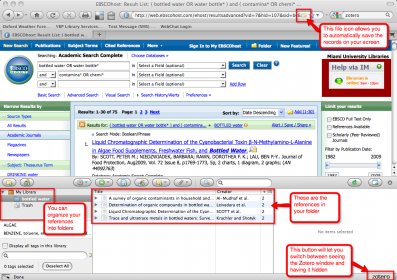
Automatically detect content and easily add it to your personal library. Simplify the process by allowing a single click to save various types of content such as preprints from arXiv.org, journal articles from JSTOR, news stories from the New York Times, and even books from university library catalogs. With support for thousands of websites, it is a comprehensive solution for researchers.
Start your next paper by building a working library, not by hunting for links. Install Zotero and its browser button, then capture articles, books, and web pages as you browse. One click saves the PDF when available and pulls in titles, authors, dates, and more. Zotero auto-renames files and lets you add notes the moment you save. Keep things tidy with folders for projects, color labels for status (to read, cited, revise), and smart folders that update themselves based on rules like tag:method or year:>2020. When you return to a topic, a single search sweeps across titles, abstracts, your notes, and PDF text, so you can find that quote you highlighted weeks ago.
When you draft, cite directly from Zotero in Word, Google Docs, or LibreOffice. Use the add-on to insert a reference, pick a style, and let page numbers, prefixes, and suffixes fall into place. Need to switch journals? Change the style and Zotero rebuilds every in-text citation and the reference list instantly. Quick-cite snippets handle emails and slides, while the full plugin manages complex documents like theses and systematic reviews. You can suppress authors, add locators, and pin citations to specific versions, keeping your manuscript consistent from outline to submission.
Turn on sync to keep your library the same on your laptop, desktop, and the web version. Choose metadata-only if you manage large PDFs elsewhere, or enable file syncing to carry attachments too; WebDAV support covers custom storage. Your data follows you into any browser, so you can add a source from the library computer and pick it up on your own machine at home. If you travel, offline copies keep reading lists available, and everything merges automatically when you reconnect.
Working with others is straightforward. Create shared libraries for a lab, a class, or a grant team; set permissions for who can add, edit, or only read. Drop in readings, attach datasets, and annotate PDFs; everyone sees the same organized structure and citations update for the whole group. Power users can install plugins, tailor citation styles, bulk clean metadata, and deduplicate records. Exports to BibTeX, RIS, or CSL JSON fit LaTeX, Pandoc, or data pipelines. Whether you’re outlining a seminar, preparing a literature matrix, or finalizing a manuscript, Zotero gives you a repeatable workflow from capture to polished bibliography.

Zotero
Free
Collect with a click
Organize your way
Cite in style
Stay in sync
Collaborate freely


Comments