Simplify keyboard control. Check out a collection of instruments for performing actions and activating features in connected gadgets and limited functional environments on a Mac. Assign keys, their combinations, and supported clicks to groups of buttons according to your needs.
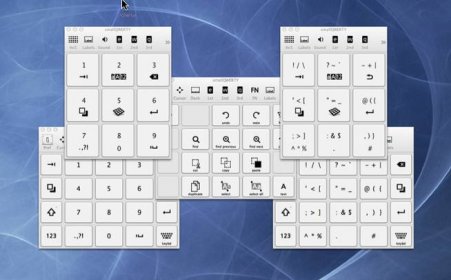
smallQWERTY is a keyboard application. It enables users to input letters, numbers, symbols, cursor keys, function keys, common file menu items, common edit menu items, and additional menu items such as folder creation with 4x5 buttons via left clicks and 3x3 buttons via left or right clicks.
smallQWERTY is a keyboard app.
You can input the following functions in groups of 4x5 buttons with left clicks, some of which in groups of 3x3 buttons with left or right clicks:
- Letters (with standard ABC and efficient smallQWERTY layouts)
- Numbers (1 ~ 0)
- Symbols (all the symbols in standard keyboard)
- Cursor keys (Left, Right, Up, Down, Home, End, Page Up, Page Down)
- Function keys (F1 ~ F12)
- Common File menus (New, Open, Save, Close, Hide, Minimize, Quit,...)
- Common Edit menus (Cut, Copy, Paste, Duplicate, Undo, Redo, Find,...)
- More menus (Folder creation, Preferences, Spotlight, Trash,...)
- Useful commands (Navigation, Screen capture, Media control,...)
- System commands (Monitor, Log off, Restart, Shutdown, Sleep)
- Desktop commands (Mission control, Dashboard, Launchpad, App/window switcher,...)
- All the individual keys of standard keyboard
- Modifiers (Command, Shift, Option/Alt, Control)
- Custom app launcherMore functions in 3x3 keyboard interface are coming soon.






Comments