

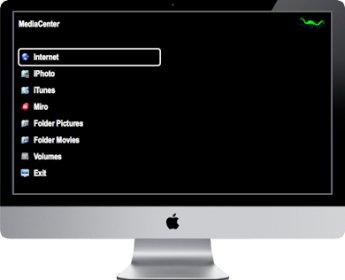
nessMediaCenter is a software that enables you to use your Mac as a primary media center. It is a great alternative to Apple's Front Row, utilizing the latest Mac technology. It is easy to use, with a neat look and feel, giving you direct access to movie and picture folders and volumes. It supports Aperture, iPhoto, iTunes, and Photos App media, including DRM (AppStore movies and TV shows). It also provides access to DLNA/UPnP media servers and their media (pictures and videos). You can also comfortably select DVDs, EyeTV movies, PDF documents, pictures, and videos in all common formats. It can be controlled by Apple remote control or the "NV Remote II" app on iPad.
nessMediaCenter enables you to use your Mac as your primary media center. It is the suitable replacement for Apple's Front Row with latest Mac technology: Easy to use with a clean look and feel Direct access to movie / picture folder and volumes Support of Aperture, iPhoto, iTunes and Photos App media including DRM (AppStore movies and TV shows) Access to DLNA / UPnP media server and its media (pictures and videos) Comfortable selection of DVDs, EyeTV movies, PDF documents, pictures and videos in all common formats Controllable by Apple remote control, "NV Remote II" app on iPad, iPhone or iPod touch, trackpad, magic mouse or keyboard
The media center offers the following functionality: Choice of background color, selection color and font color / size Activation / deactivation of content Ad hoc construction of playlists with pictures, movies, media shows, PDF documents Presentation of this playlist or single media iTunes control to switch playlists / tracks or start / stop playback (including informations of the current track) Mark of unplayed movies which are stored in iTunes (if iTunes is started). Automatic dimming of the screen after five minutes Optional automatic display of the media center at application start Optional EyeTV activation or computer shutdown by selection of exit
During a presentation several functions are available: Increase of playback speed (up to 64x) Endless playback Sorting by name, path or random Fullscreen switch (e.g. for different presentations on 2 displays) Aspect ratio (4:3; 16:9; 21:9) Zooming Language selection (track activation; if available) DVD: selection of the default language (including automatic selection of audio passthrough if available)


Comments