Google Drive is Google's take on the cloud storage service. With Google Drive, you can upload files to Google's servers and sync them automatically with those stored in your computer. Google Drive is basically identical to DropBox, but it will appeal a lot to Google Mail users. Google Drive gives you 5 gigabytes to start with for free, and you can purchase more storage if you want to.
When you install Google Drive on your Mac, it will create a folder called "Google Drive". Any files that you copy or move to that folder will be automatically uploaded to Google's servers and be accessible from any device that you can run Google Drive on. Of course, you always have the web interface, which you can access from any device with a browser, and there will also be an iOS app soon.
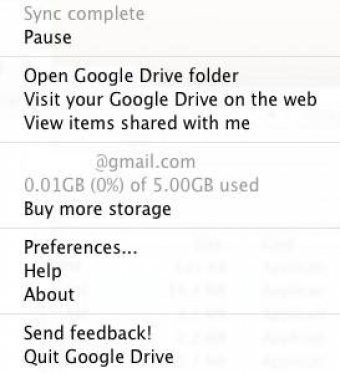
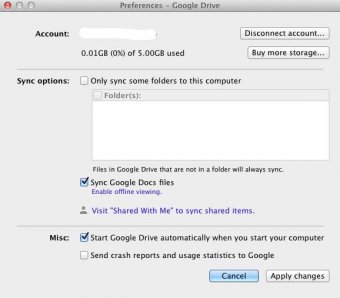
Google Drive will run when you boot your Mac, and you can access the settings from the menubar icon. The menu that pops up when you click on the icon will show the status of your account, how many files are syncing at the moment, and the remaining space on your account. There is also an option to buy more storage there.
Setting up Google Drive was very easy. The app started working right away and without any problems. I synced a 10-megabyte test file in less than a minute, and it was immediately available on the web interface.
Note that you may have to join a wait list to get Google Drive. After you join the list, you will be e-mailed when you have gained access to it. I was on the wait list for less than a day.


Drive Enterprise
$8.00 per user / month
No storage limits
Google Docs, Sheets, and Slides
Privacy Shield certified
Data processing commitments
24/7 phone and email support
Security, privacy, and compliance controls
Company-wide user management
Centralized Admin console
Audit and reporting
Vault for eDiscovery covering Drive files
Data loss prevention for Drive
G Suite
$10.00 per user / month
Includes features of Drive Enterprise plan, plus
No storage limits (unless < 5 users, then 1TB per user)
Vault for eDiscovery covering Drive files, Gmail, and Hangouts Chat
Data loss prevention for Drive and Gmail
Business email through Gmail
Shared calendars
Video and voice conferencing
Secure team messaging





Comments (7)
It encloses a wide capacity of files, images , data ,etc.