v4.1 [Jan 25, 2017]
- Added messaging about not sharing to YouTube if you don't have a YouTube channel set.
- Fixed crash when cancelling during sign-in to YouTube.
- Fixed crash when cancelling or closing Snagit while trying to sign-in to Google Drive.
- Fixed issue where the last file location wasn't being remembered for Batch Export, Import Stamps and Save options.
- Upgraded the Dropbox API which will require user sign in again.
- Fixed issue where pasting images to MS Office documents from Outputs failed.
- Improved reliability and responsiveness when sharing to Screencast.com.
- Fixed issue causing Snagit not to appear in the Applications folder.
- Fixed issue that would cause longer MP4 files not to playback in QuickTime Player.
- Fixed issues where cropping couldn't be undone or canceled.
- Fixed issue where Finder didn't open after clicking on File Notifications.
- Fixed issue preventing captures saved outside of Library from being shared.
- Fixed issue requiring mouse movement to display Close button in Image Tray.
- Made opening Outputs in Preferences faster.
- Fixed crash that could occur during undo after resizing a text box.
- Made web URLs in the Get Info view clickable.
v2.1 [Jul 18, 2012]
- Fixed a crash on launch for users with computers configured with non-US locales.
- Fixed a crash when adjusting properties on some of the tools.
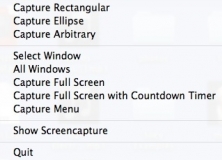

Quickly capture your full screen, a region of your screen, or scrolling window.