FileLink 1.0

Free Transfer files between other Macs on your network with ease.
3.4 
Rating
Your vote:
Latest version:
1.0 See all
Developer:
Download
Free  
Freeware
Used by 9 people
Info updated on:

FileLink lets you transfer files between other Macs on your network with ease. FileLink uses your local network and WiFi Direct to discover other Macs nearby that also have FileLink installed.
To get started using FileLink, select some folders on your computer, add a password (optional) to them, and add them to your shared folders list. Other computers using FileLink that connect to your computer will be able to access those shared folders and manage the files within. Once connected to a remote, shared folder, just drag and drop files between FileLink's browser and Finder for an easy exchange.
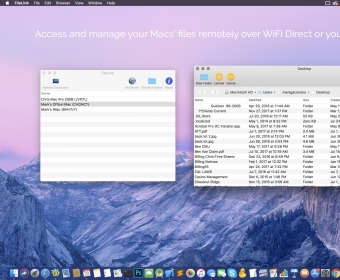
Screenshot (1)

Comments

3.4
Rating
29 votes
5 stars
10
4 stars
4
3 stars
5
2 stars
7
1 stars
3
User

Your vote:

Related apps

Android File Transfer
Free
rating

Free utility that helps you transfer files.

Nifty File Lists
Nifty File Lists
rating

Creates file lists, extracts metadata and saves them in multiple formats.

TI-Nspire Computer Link
Free
rating

Share files between handheld and computer.

X-DAP Link
X-DAP Link
Free
rating

A USB music file transfer app to transfer audio files from Mac to the DP-X1.

iPubsoft iPhone to Mac Transfer
rating

This app helps you transfer files from your iOS device to your Mac.

Tags